ACDSee Photo Studio Home27.0.2.2553
Publisher Description
Manage Your Photos and More
Your photos deserve to be seen. With ACDSee Photo Studio Home 2024s unrivalled Digital Asset Management (DAM), you will find a formidable, versatile, and easy to use system that will keep your photos organized and accessible.
What's New in Photo Studio 2024?
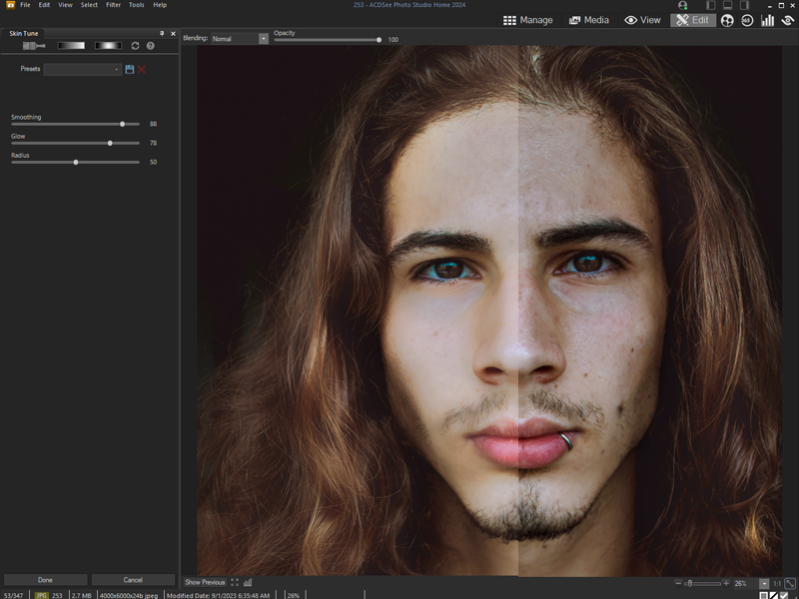
ACDSee Photo Studio Home 2024 includes new features and improvements to make your life easier. New 2-way embedding of Category and Keyword Metadata between ACDSee IPTC, dynamic filtering of Category Keyword lists, and several workflow performance improvements requested by ACDSee enthusiasts will give your file management the boost it has been waiting for. Take basic photo editing up a level with the new Skin Tune and Grain tools.
Improve Skin Tone and More
Make the people in your photos shine using the new Skin Tune tool. Even out skin tone and restore glow to your subjects, as well as brighten and smooth skin with easy-to-use sliders. Use slight adjustments to give your photos a natural polished look or create a dream-like scene by going full-strength.
Filter Categories and Keywords
With category and keyword filtering, youll find exactly what you want as you type. Simply begin typing the category or keyword you are looking for and watch as the filtered results are dynamically generated.
Two-Way Metadata Embedding
Simplify the process of migrating and sharing category and keyword metadata by seamlessly integrating your ACDSee metadata with IPTC and vice versa. Embed ACDSee Category and ACDSee Keyword metadata to your photos to share with friends and family. Import IPTC Keyword and Category data from received photos into ACDSee, ensuring seamless photo organization, regardless of their source.
Camera RAW Update
Popular camera models have been added to the list of 700+ supported RAW file types.
Go Vintage with the Grain Tool
Give your images a cool, vintage appearance with the new Grain tool.
About ACDSee Photo Studio Home
This Viewers program is available in English. It was last updated on 29 September, 2026. ACDSee Photo Studio Home is compatible with the following operating systems: Windows.
The company that develops ACDSee Photo Studio Home is ACD Systems International Inc.. The latest version released by its developer is 27.0.2.2553. This version was rated by 1 users of our site and has an average rating of 4.0.
The download we have available for ACDSee Photo Studio Home has a file size of 8.4 MB. Just click the green Download button above to start the downloading process. The program is listed on our website since 2023-10-18 and was downloaded 499 times. We have already checked if the download link is safe, however for your own protection we recommend that you scan the downloaded software with your antivirus. Your antivirus may detect the ACDSee Photo Studio Home as malware if the download link is broken.
How to install ACDSee Photo Studio Home on your Windows device:
- Click on the Download button on our website. This will start the download from the website of the developer.
- Once the ACDSee Photo Studio Home is downloaded click on it to start the setup process (assuming you are on a desktop computer).
- When the installation is finished you should be able to see and run the program.
Program Details
System requirements
Download information
Pricing
Version History
version 27.0.2
posted on 2023-10-18
Fixed an issue that could cause ACDSee Keywords not to retain their hierarchy when embedded.
version 27.0.1.2538
posted on 2023-10-04
ACDSee Photo Studio Home 2024 includes new features and improvements to make your life easier. New 2-way embedding of Category and Keyword Metadata between ACDSee & IPTC, dynamic filtering of Category & Keyword lists, and several workflow & performance improvements
version 26.0.3.2248.53
posted on 2023-03-22
RAW Update 1.4.17.53
Support added:
Canon EOS R6 Mark II, Canon EOS R8, Canon EOS R50
Fujifilm X-H2, Fujifilm X-T5
Hasselblad H5D
OM System OM-5
Support improved:
Fujifilm GFX 100S
Hasselblad CFV II 50c
Nikon D780, Nikon Z6 II, Nikon Z7
OM System OM-1
Sony Cyber-shot DSC-RX100 VA
version 26.0.3.2248
posted on 2022-11-02
Fixed an issue where on first launch on a non-English locale OS, the application did not launch correctly.
Fixed an issue where Quick Search Options Import from 2022 to 2023 always turned off Include ACDSee Metadata and Include ACDSee Keywords options.
version 26.0.0.2224
posted on 2022-09-21
Advanced AND/OR Search, choose from numerous search criteria, including ACDSee Metadata and EXIF & IPTC fields. Built-in logic for AND/OR states let you narrow down results to a microscopic level. With the newly designed Quick Search, you can now quickly perform more complex searches.
version 25.1.1.1946
posted on 2022-04-13
Fixed keyboard shortcuts not working after the Map pane is opened.
Fixed a rare crash in People mode while grouping unnamed faces. Note: ACDSee Home 64-bit version only.
Corrected color display for the midtones color picker in Edit mode Levels filter.
version 25.0.0.1871
posted on 2021-09-22
People mode: put a name to a face easier with an AI-driven mode for identifying and managing people.
Media mode: browse and filter faster with a database-driven view for accessing previously browsed folders.
Squareness slider for customizing the shape of the radial gradient.
SVG support and more!
version 25.0.0.1868
posted on 2021-09-22
Clean and simple Digital Asset Management (DAM) should not be an enigma lost in the mists of Shangri-la. Home 2022 offers photographers of any skill level the best DAM tools on the market. Easy to use and robust enough to tackle any challenge
version 24.0.1.1671.0
posted on 2020-09-23
Added Color EQ and Split Tone in Edit mode
Support for importing face data from Lightroom and Picasa
GoPro .GPR files support
The ability to make custom presets in Batch Rename
A toggle option to search the entire database or the selected files
Added RAW support for new cameras
And more!
version 24.0.1.1671
posted on 2020-09-23
For the home photographer, ACDSee Photo Studio Home 2021 lets you take your photography and your image organization to the next level. For 2021, you get access to new filters and features that optimize your workflow and editing process so you can make your images award winners.
